3D Bluetooth Sleep Mask with Ultra-Thin Built-In Speakers
3D Bluetooth Sleep Mask with Ultra-Thin Built-In Speakers
Couldn't load pickup availability

3D Bluetooth Sleep Mask with Ultra-Thin Built-In Speakers
Product Overview
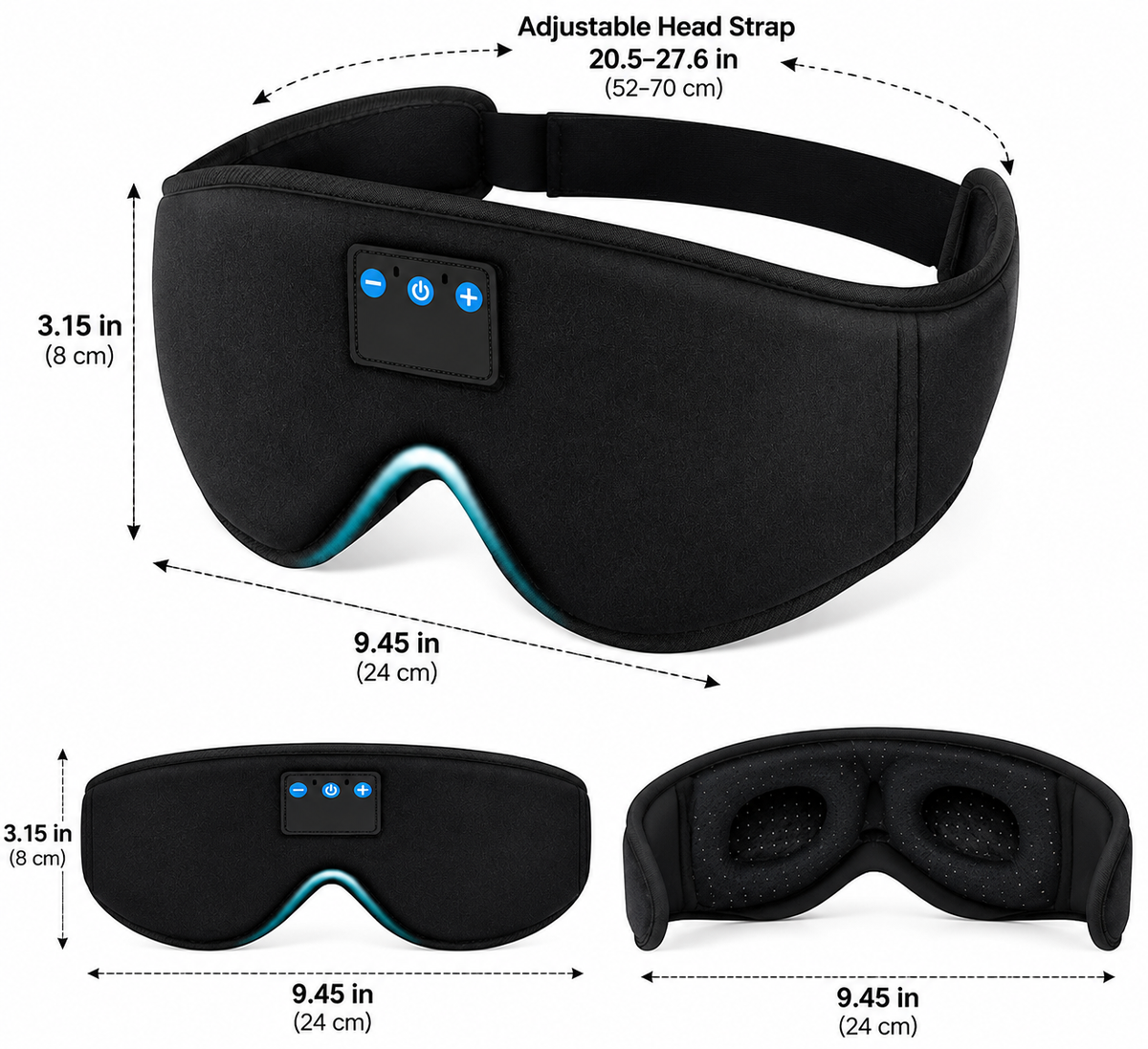
Enjoy a convenient combination of an eye mask and personal audio in one comfortable design. This 3D Bluetooth sleep mask features a contoured shape, soft black fabric, built-in ultra-thin speakers, and an adjustable head strap. It is designed for relaxation, rest, and audio listening, including while lying on your side.
Key Features
3D Contoured Design
The shaped eye area provides space around the eyes while helping cover them from surrounding light. Its contoured construction is designed with resting comfort in mind.
Built-In Ultra-Thin Speakers
Integrated speakers deliver audio without requiring separate earphones. The low-profile design helps keep the audio components within the mask.
Bluetooth Connectivity
Connect the mask to a compatible Bluetooth-enabled device for convenient wireless audio playback.
Side-Sleeping-Friendly Profile
The mask features a soft, contoured structure designed for use while resting on your back or side.
Soft Fabric Construction
The black fabric exterior and padded eye area provide a soft feel for everyday relaxation and rest.
Adjustable Head Strap
The elastic strap can be adjusted to help achieve a secure fit for different head sizes.
Convenient Button Controls
The built-in control panel includes power, plus, and minus buttons for operating supported functions.
Product Specifications
Product Type: Bluetooth Sleep Mask
Design: 3D Contoured Eye Mask
Color: Black
Material: Fabric and Padded Components
Connectivity: Bluetooth
Audio System: Built-In Ultra-Thin Speakers
Controls: Integrated Button Panel
Fit: Adjustable Elastic Head Strap
Intended Use: Resting, Relaxation, and Audio Listening
Package Contents: 1 × Bluetooth Sleep Mask
How to Use
1. Charge the device according to the manufacturer's instructions before first use.
2. Turn on the mask and activate Bluetooth pairing mode as described in the supplied instructions.
3. Enable Bluetooth on your compatible device and select the mask from the available device list.
4. Position the mask comfortably over your eyes and adjust the strap for a secure fit.
5. Use the built-in buttons to control supported audio functions.
6. Turn off the device after use and store it in a clean, dry place.
Care and Safety Instructions
Keep the electronic components dry and away from excessive heat or moisture.
Do not immerse the mask or its electronic components in water. Follow the manufacturer's cleaning instructions.
Adjust the strap gently and avoid excessive pressure around the eyes or head.
Stop using the product if discomfort or skin irritation occurs.
Do not use the mask while driving, cycling, or performing activities that require full visual awareness.
Keep the product and charging accessories away from young children when not in use.